How to Track Quests and Claim Rewards
Open QUESTS on the left of the lobby to check Portal Tower Defense quests. Read each requirement and counter, complete the task, then return to the panel and use CLAIM ALL. Daily, Weekly and Achievements have separate tabs, so check which board you are viewing before planning a run.
Read the Daily tasks and coin rewards
Click QUESTS on the left side of the lobby screen. The recorded panel opens on Daily, with Weekly and Achievements beside it. Each row has a requirement, a reward, a progress counter and a percentage. Read the live values before entering a stage because the examples below come from November 27 creator footage.
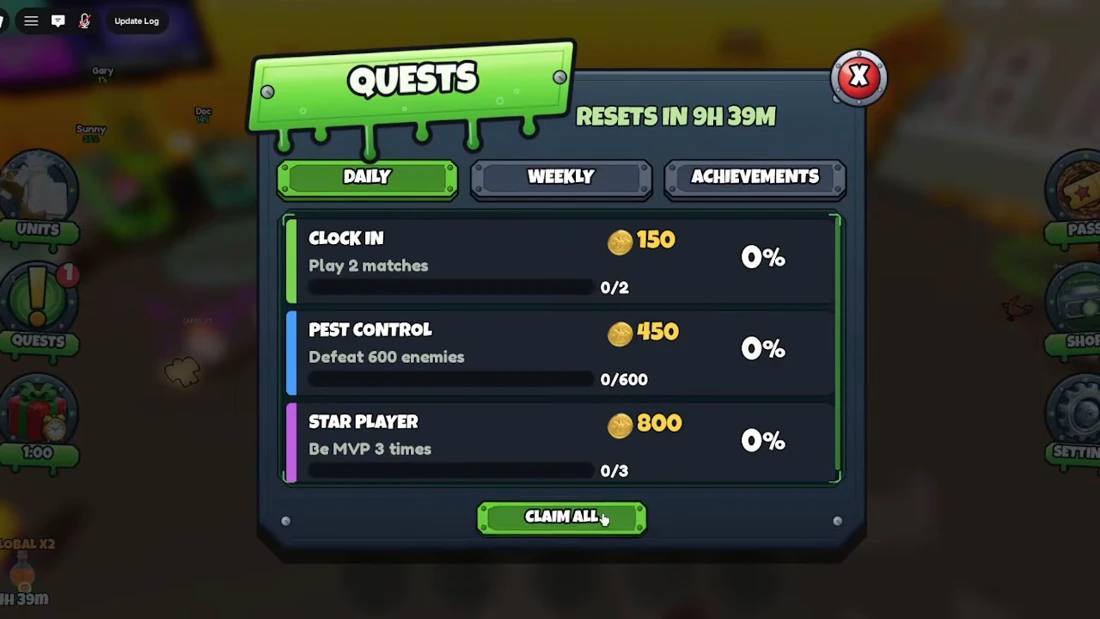
The Daily board shows CLOCK IN, play 2 matches for 150 coins, with a 0/2 counter. PEST CONTROL asks you to defeat 600 enemies for 450 coins, starting at 0/600. STAR PLAYER asks you to be MVP 3 times for 800 coins, starting at 0/3. All three rows are incomplete in this recording.
Plan a run around remaining progress
Choose your next session around the counters you still need. CLOCK IN uses a match count, while PEST CONTROL uses an enemy count. Two matches and 600 enemies are separate requirements. After a completed round, reopen the board and compare the fractions with your earlier values to see which objectives advanced.
For STAR PLAYER, check whether the MVP counter increased after the results screen. The footage does not establish the MVP calculation, whether solo runs qualify, or any required difficulty. Match victory alone is insufficient evidence of MVP credit. Credit for losses, early exits and unfinished matches also remains unverified, so avoid building a quest route around those assumptions.
Find Claim All and confirm collection
When a row reaches its required amount, return to QUESTS and locate CLAIM ALL below the list. Note your coin balance before pressing it, then check the balance and the row state afterward. The recording shows the button with zero progress, so it demonstrates the control location without proving a successful quest payout.
The three displayed rewards add up to 1,400 coins if all three tasks are completed and claimed at those values. That total is separate from stage rewards. The timed gift button and Pass are separate lobby controls. Use the quest panel to check quest collection, and investigate any unchanged balance before counting those coins as received.
Check Weekly and Achievements separately
The official description names daily and weekly quests from News Milo and Doc. Another gameplay recording shows a WEEKLY QUESTS character beside the Crafting station, in front of a building with a striped awning. You can locate that sign in the hub and inspect Weekly in the QUESTS panel before choosing a longer assignment.
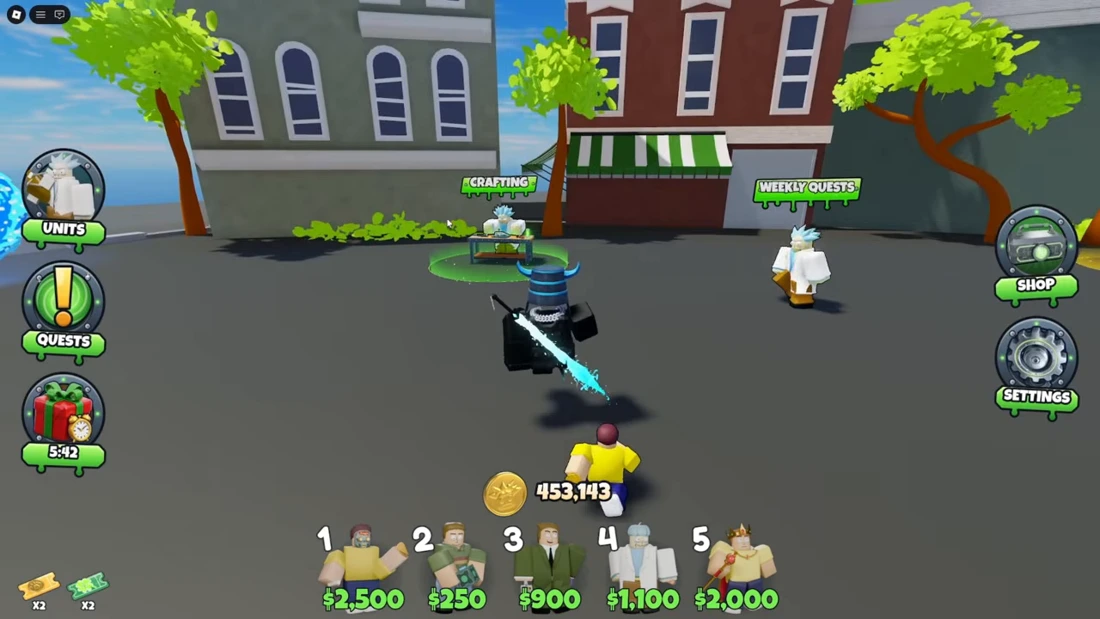
Weekly and Achievements are visible tabs, but their task lists and rewards are absent from the reviewed footage. Check their current rows directly before relying on any reward estimate. The Daily header reads RESETS IN 9H39M in the recording, which is a remaining countdown. It does not establish a universal reset hour, a weekly schedule, or the reset rules for Achievements.