Official Promo Codes and Shop Redemption Guide
Open the Shop window in the lobby and scroll to the Codes text field to enter officially published promo strings like 900CCU, WubbaLubba, and Portal.
Officially Published Promo Codes
The official Roblox experience description for Portal Tower Defense, checked on November 28, 2026, lists five promo codes with exact capitalization: 900CCU, WubbaLubba, Portal, Thanksgiving, and Thanksgiving2. Because the developers manage code availability on their live servers without announcing fixed expiration schedules in the description, these five strings are presented from the official listing and have not been personally redeemed on a test account.
- 900CCU
- WubbaLubba
- Portal
- Thanksgiving
- Thanksgiving2
You may occasionally see external community lists mention older or unconfirmed strings, yet sticking to the official description first ensures you are trying the exact codes promoted by the development group. Enter each of the five listed codes one at a time in the in-game menu to see which ones are currently active on your server. Check the official game description again after updates rather than assuming an old list is current.
How to Redeem Codes in the Shop Menu
To access the redemption box, load into the Portal Tower Defense lobby and click the Shop icon located on the side of your screen. Scroll through the regular Shop window until you reach the Codes section, which displays a text input field alongside a Redeem button. Click inside the text field, type or paste one code such as Thanksgiving or 900CCU, and press the Redeem button to submit it to the server.
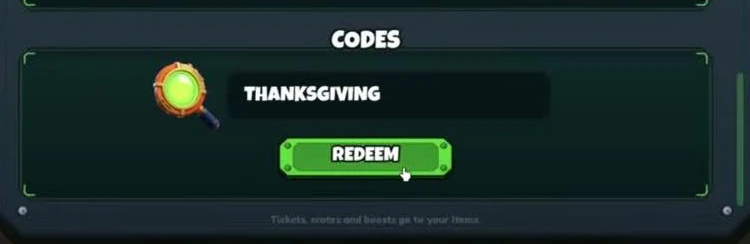
Watch the interface immediately after pressing Redeem to read the status message returned by the game, and follow the actual message. The reviewed frame shows the input and button, with no verified success result. Clear the text field completely before typing the next code from the list so characters from two different strings do not run together. Legitimate code redemption happens entirely inside this in-game Shop panel and never requires visiting external websites or sharing account credentials.
First-Win Requirements and Entry Troubleshooting
A third-party guide reports a one-win requirement before codes can be redeemed on a fresh account. If the game asks for a win or blocks redemption when you first join the lobby, step into an Easy portal on Isolated Desert, clear all twenty waves to record your first victory, and return to the Shop menu to retry the codes. The reviewed Easy clear shows a victory summary and a Lobby button for returning to the hub.
If a code fails to go through after you have completed a match, double-check that your capitalization matches the official listing, including capital letters in WubbaLubba, Portal, Thanksgiving, and Thanksgiving2, as well as all-caps in 900CCU. Remove any trailing spaces at the beginning or end of the text box that can slip in when copying and pasting text. If it still fails, record the message and check the latest official listing. A failure alone does not identify its cause.
Checking Your Account After Redemption
Because the official game description publishes the five promo strings without printing an item-by-item reward table, always check the on-screen feedback when a code succeeds to see what was added to your profile. Third-party community guides report that seasonal and milestone codes have historically granted items such as Coin Boosts, Luck Boosts, or themed event crates, though exact contents can change across updates.
After submitting the official codes in the Shop window, check your lobby Coin counter at the top of the screen and open your inventory menus to inspect any newly added crates or consumable boosts. If you receive a temporary boost item, read its in-game tooltip before activating it so you are ready to run matches or visit the Operation Phoenix summon board while the effect is active.